

- 600+ models available directly from the Claude Cowork model picker: Sonnet, Opus, Haiku, GPT, Gemini, Mistral, Llama, and more.
- Policies for Fallback, Load Balancing, and Latency Routing without changing a thing on the client.
- Spend tracking: every Cowork session shows up in usage analytics and cost tracking, tagged as Claude Cowork traffic via the
X-Titleheader. - No Anthropic account required. “Continue with Gateway” lets teams use Claude Cowork with just a Requesty key.
- Enterprise deployment: export a
.mobileconfig(macOS) or.reg(Windows) file from the Cowork setup UI to roll the Requesty configuration out via MDM / Group Policy.
How it works
Prerequisites
- Claude Cowork installed. Download from Anthropic.
- A Requesty API key from the API Keys page.
Configuration
1
Enable Developer Mode
Open Claude Cowork (no sign-in required) and go to Help > Troubleshooting > Enable Developer Mode.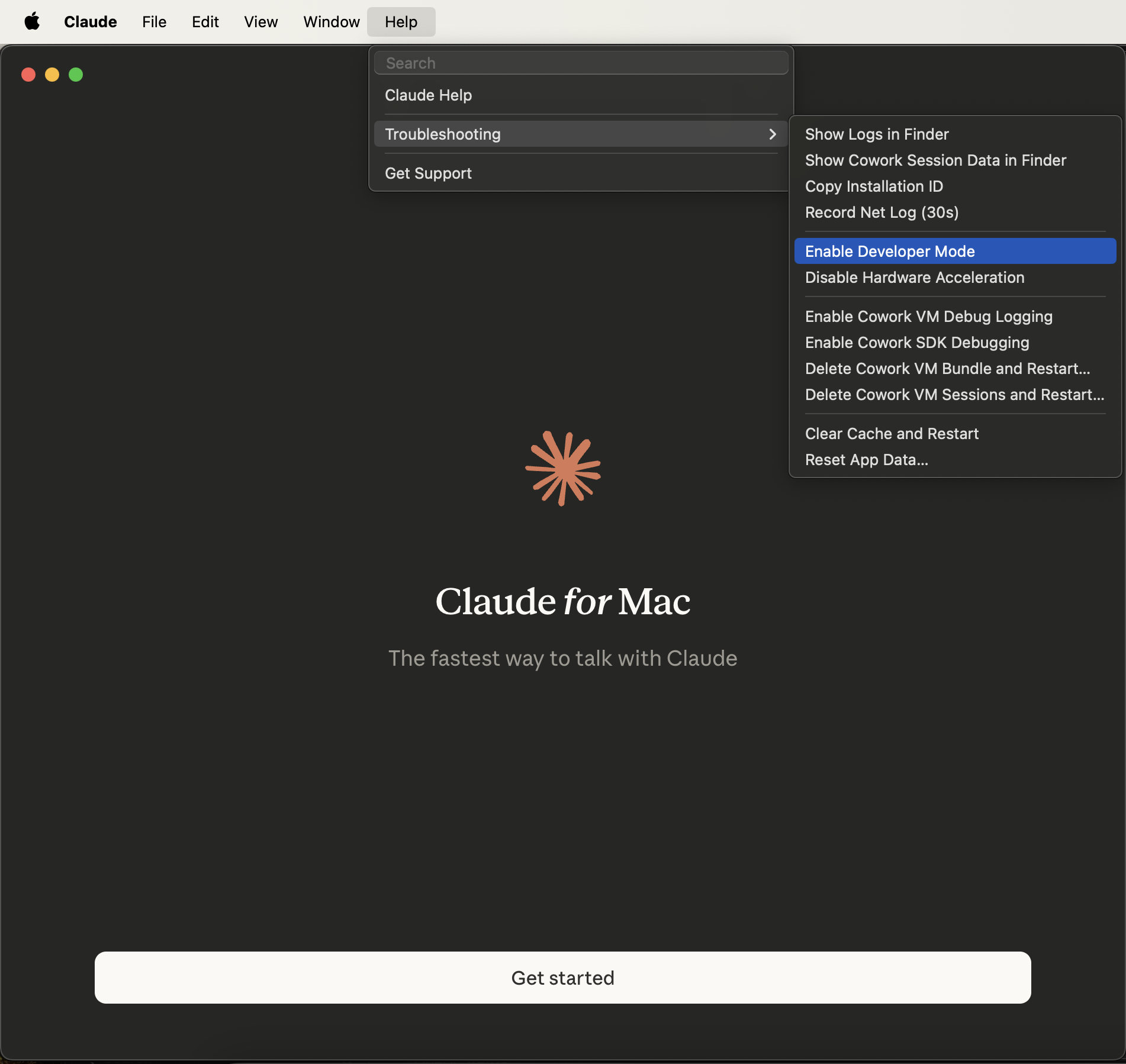
2
Open the third-party inference panel
From the new menu bar item, choose Developer > Configure Third-Party Inference.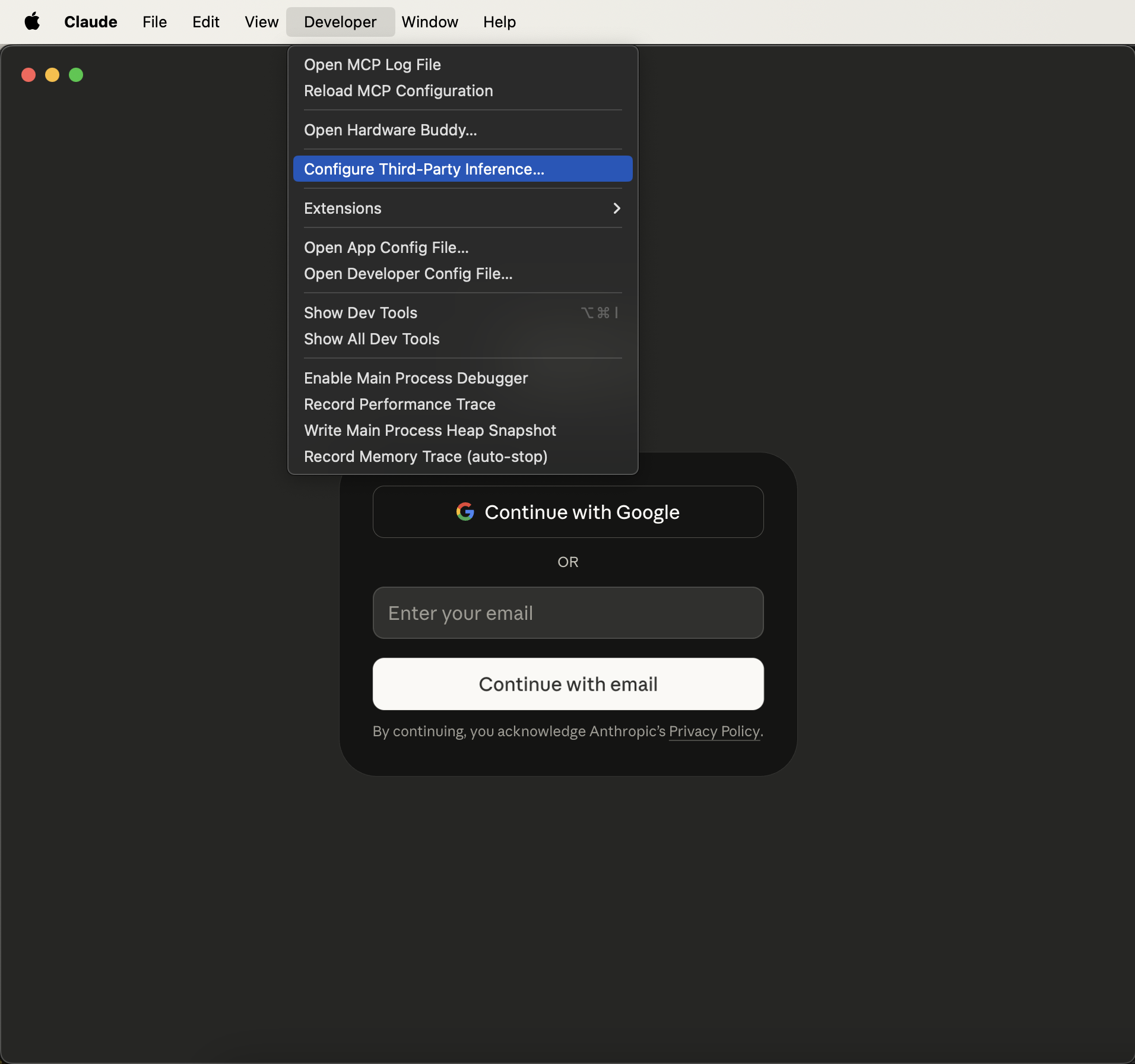
3
Select Gateway and fill in the Requesty credentials
In the Configure third-party inference panel, pick Gateway (Anthropic-compatible) as the inference backend and enter: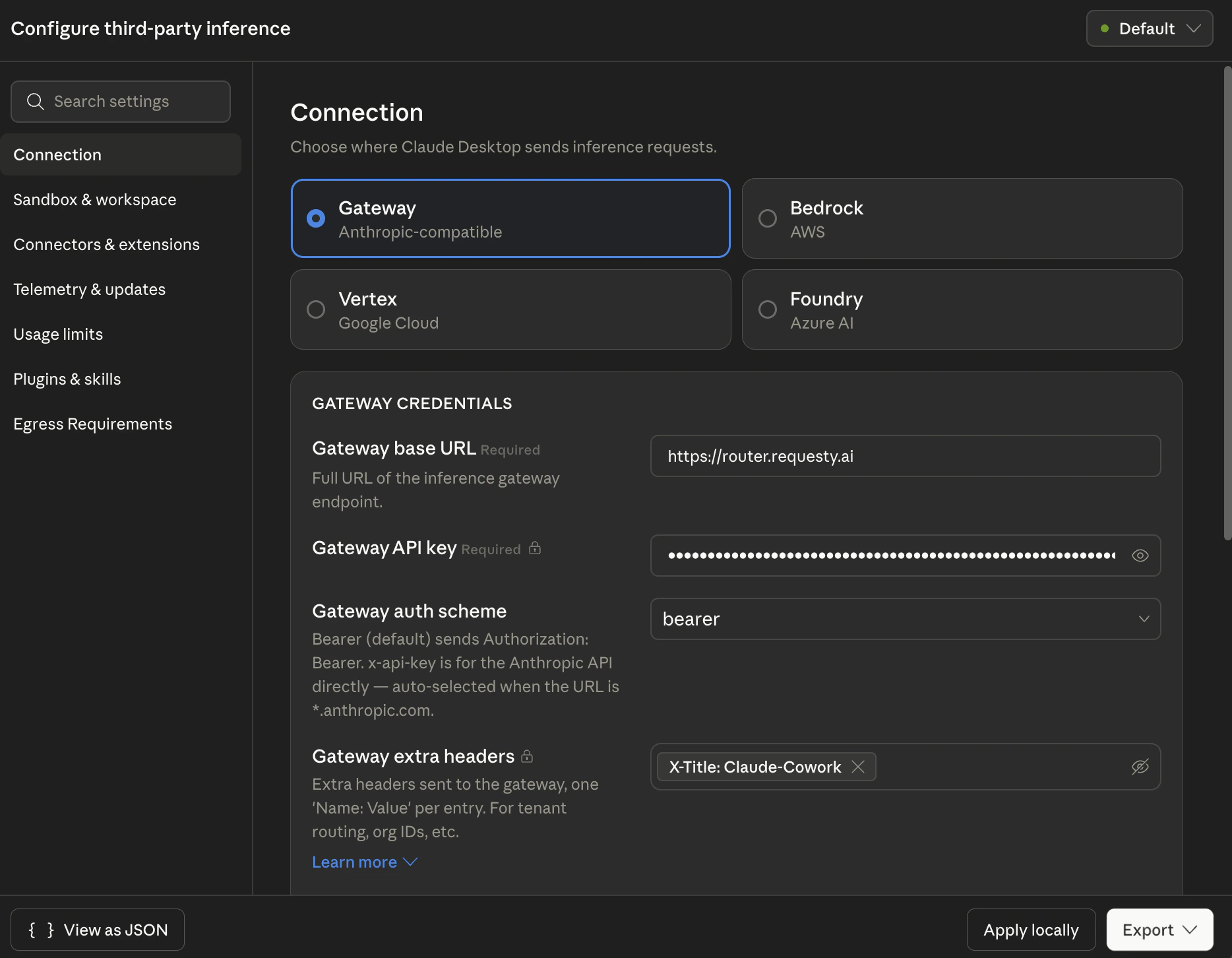
Why
X-Title: Claude-Cowork? Requesty reads the X-Title header to tag requests in analytics. Setting it to Claude-Cowork lets you filter Cowork traffic separately from your API, Claude Code, or Cline usage in Usage Analytics and Cost Tracking. You can use any value you like, for example Claude-Cowork-Design-Team, to segment further..mobileconfig for macOS MDM or a .reg file for Windows Group Policy / Intune (see MDM deployment below).The other three backends (Bedrock, Vertex, Foundry) talk directly to AWS / GCP / Azure and bypass Requesty. Use Gateway if you want routing, fallbacks, spend tracking, and access to non-Anthropic models.
4
Restart Claude Cowork and continue with Gateway
Quit and reopen Claude Cowork. On launch you’ll see a chooser. Pick Continue with Gateway (labeled Local configuration). No Anthropic account is needed.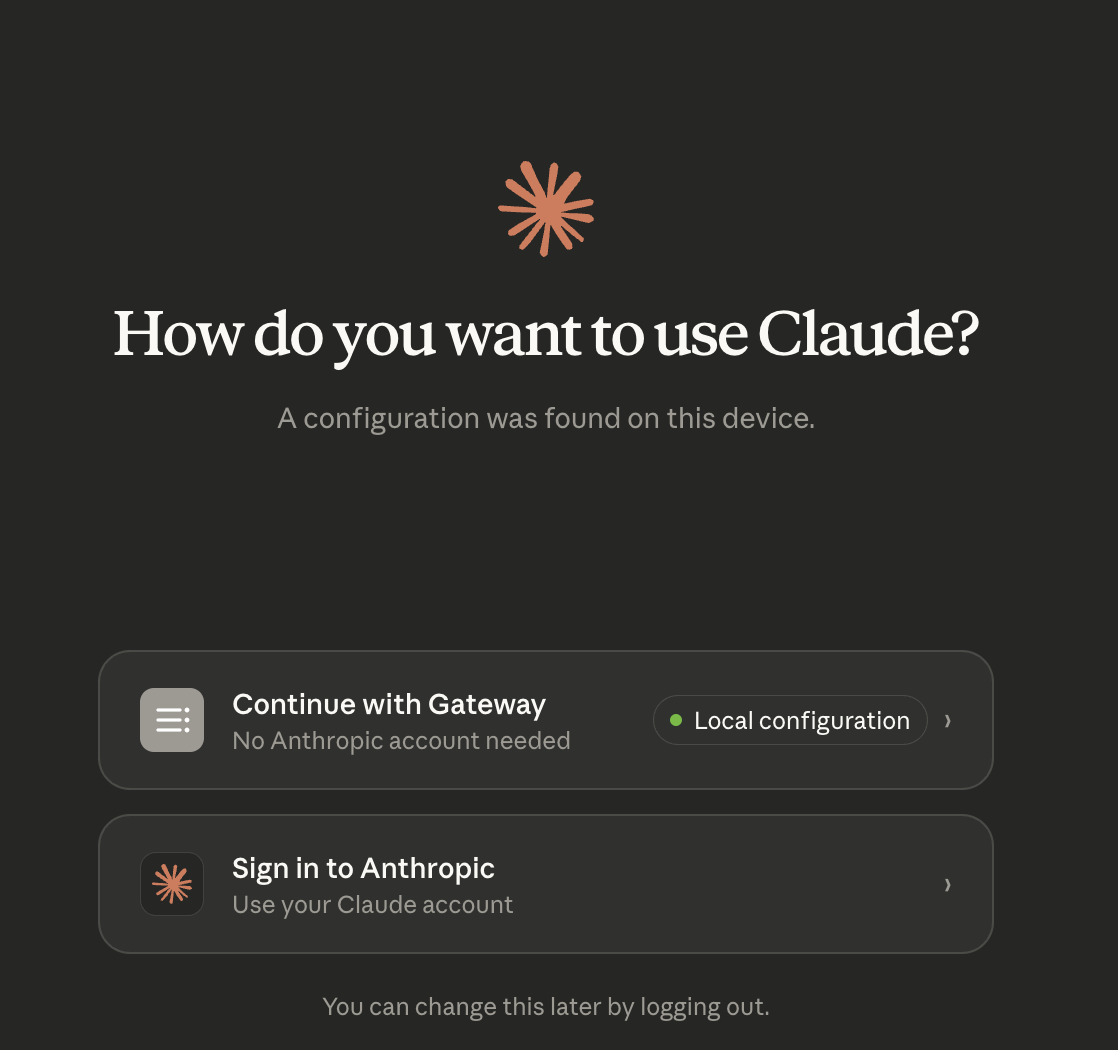
5
Pick a model or policy
The model picker in the top-right now lists every model and policy your Requesty org has access to. Select one and start working.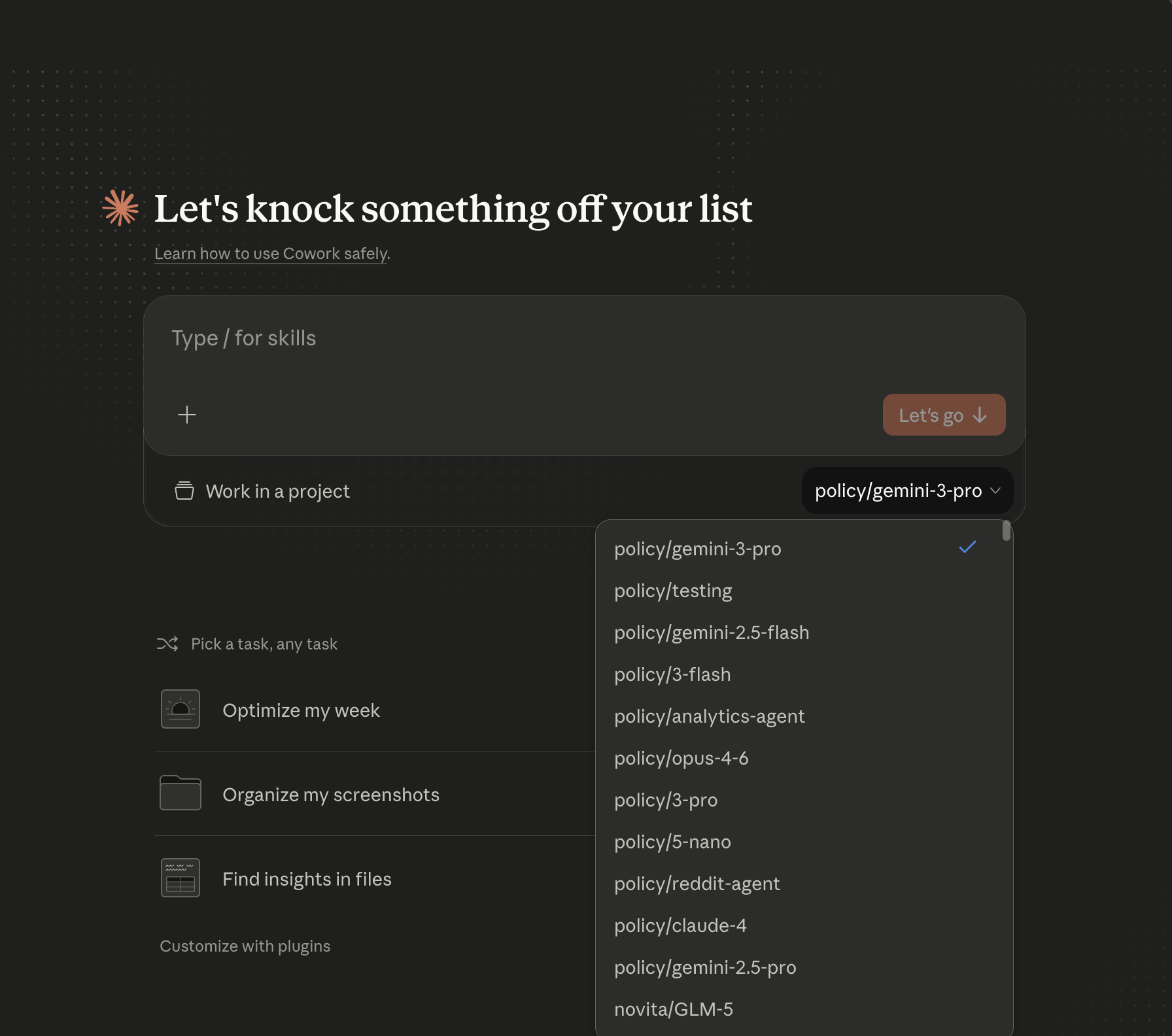
Model selection
Any entry from the Model Library works. Model IDs follow the familiarprovider/model-name format:
Policies follow
policy/<policy-name>:
policy/reliable-sonnet-4-5policy/opus-4-6policy/gemini-3-pro
EU data residency
For EU-only routing, change the gateway base URL to the EU router:MDM deployment
The Export button in the Configure third-party inference panel produces a ready-to-deploy configuration file so you can roll Requesty out to an entire team:- macOS:
.mobileconfigpayload you can push with Jamf, Intune, Kandji, or any Apple MDM. - Windows:
.regfile suitable for Group Policy Preferences or Intune custom profiles.
Benefits of Requesty + Claude Cowork
600+ Models, One App
Sonnet, Opus, GPT, Gemini, Mistral, Llama, all selectable from the Cowork picker.
Policy-Driven Routing
Point Cowork at a policy and get fallback + load balancing without touching the client.
Spend Visibility
Filter Cowork traffic in analytics via the
X-Title: Claude-Cowork tag.MDM-Ready
Export
.mobileconfig / .reg once and push the setup to your whole org.Troubleshooting
Still seeing “Sign in to Anthropic” on launch
Claude Cowork only shows Continue with Gateway after a valid configuration has been saved. Re-open Developer > Configure Third-Party Inference, verify the four fields, and click Apply locally again. A full app restart is required.401 Unauthorized from the gateway
- Confirm Gateway auth scheme is set to
bearer(notx-api-key, which is reserved for URLs ending in*.anthropic.com). - Re-paste your Requesty API key. Trailing whitespace from the clipboard is a common culprit.
- Verify the key is active at app.requesty.ai/api-keys.
Model isn’t in the picker
Cowork pulls the model list through the gateway, so the model must be approved for your Requesty org. Check:- The model exists in the Model Library.
- It’s in your org’s Approved Models list (if your org restricts models).
- For policies, the policy name must match
policy/<name>exactly.
Cowork traffic isn’t tagged in analytics
Open Developer > Configure Third-Party Inference and confirm the Gateway extra headers field containsX-Title: Claude-Cowork (or your custom value). The header is sent on every request and surfaces in Usage Analytics as a filterable field.
Developer menu doesn’t appear
Help > Troubleshooting > Enable Developer Mode is a toggle. If the menu isn’t showing, it may have been disabled by an MDM profile. Ask your admin, or deploy the exported.mobileconfig directly so end users don’t need Developer Mode at all.